SLIDE-1-TITLE-HERE

Replace these every slider sentences with your featured post descriptions.Go to Blogger edit html and find these sentences.Now replace these with your own descriptions.This theme is Bloggerized by Lasantha - Premiumbloggertemplates.com[...]

SLIDE-2-TITLE-HERE

Replace these every slider sentences with your featured post descriptions.Go to Blogger edit html and find these sentences.Now replace these with your own descriptions.This theme is Bloggerized by Lasantha - Premiumbloggertemplates.com[...]

SLIDE-3-TITLE-HERE

Replace these every slider sentences with your featured post descriptions.Go to Blogger edit html and find these sentences.Now replace these with your own descriptions.This theme is Bloggerized by Lasantha - Premiumbloggertemplates.com[...]

If you are going [...]

SLIDE-4-TITLE-HERE

Replace these every slider sentences with your featured post descriptions.Go to Blogger edit html and find these sentences.Now replace these with your own descriptions.This theme is Bloggerized by Lasantha - Premiumbloggertemplates.com[...]

SLIDE-5-TITLE-HERE

Replace these every slider sentences with your featured post descriptions.Go to Blogger edit html and find these sentences.Now replace these with your own descriptions.This theme is Bloggerized by Lasantha - Premiumbloggertemplates.com[...]

Showing posts with label Internet. Show all posts

Saturday, 26 November 2011

Vodafone, HDFC Bank launch mobile banking in Rajasthan

CHOMU (RAJASTHAN): Leading telecom service provider Vodafone India and private lender HDFC Bank Saturday launched "m-paisa", a mobile banking service in Rajasthan to enable millions of unbanked Indians perform basic banking transactions on their mobile phone.

"It is a great oppotunity for a country like India to improve financial inclusion through mobile banking. It is a pioneering initiative modeled on the lines of Vodafone's m-pesa product running in three different countries of Africa, offering to more than 17 million people basic financial services beyond the reach of traditional banking," said Sunil Sood, director, business operations, Vodafone India.

"With our reach and ability to connect customers, we expect many million people to come into the banking fold through this service," he added. 


This initiative will allow Vodafone's select retailers to act as HDFC's sub-agents through which customers can deposit and withdraw cash through their mobile phone without having to go to bank branches.

In Rajasthan where this national partnership has been implemented, over 2,200 retailers across 320 villages and 54 towns are operational in opening HDFC Bank mobile bank accounts with Vodafone m-paisa.

"There are 6,00,000 habitations but only about 89,000 bank branches in the country, making access to banking services difficult in remote areas. We feel that Vodafone's significant distribution reach will provide customers the security of financial transaction offered by bank," said Rahul Bhagat, country head, retail liabilities, marketing and direct banking channels, HDFC Bank.

The companies will expand the service pan-India in a phased manner by March-April next year and also have plans to deliver it in all the major languages gradually. Currently it is available only in English.

In order to open an account, a customer will have fill in a KYC (know your customer) form and submit it to the retail outlet authorised by Vodafone and then start availing service on fulfilment of the bank's formalities by dialing *135#.

Speaking about the security of the service, Reserve Bank of India deputy governor K.C. Chakrabarty, who launched the service, said: "We will be supervising HDFC Bank ... we have issued mobile banking guidelines. We want to ensure that efficient use of mobile technology takes place in financial inclusion." 


Source

By TECHXPAN with No comments

Friday, 25 November 2011

Keep Your System Safe Using Malwarebytes


Malwarebytes is a powerful tool that helps to detect and removes all traces of malwares from your system.

Features:
Lightning fast scan speeds.
Full scans for all drives.
Priority database updates.
Ignore list for both scanner and protection module.
Extra utilities to help remove malware manually.


Download

By TECHXPAN with No comments

Syn Your Datas with Dropbox


Dropbox is a free service that lets you bring all your photos, docs, and videos anywhere. This means that any file you save to your Dropbox will automatically save to all your computers, phones and even the Dropbox website. Dropbox also makes it super easy to share with others, whether you're a student or professional, parent or grandparent. Even if you accidentally spill a latte on your laptop, have no fear! You can relax knowing that Dropbox always has you covered, and none of your stuff will ever be lost.


Source

By TECHXPAN with No comments

Thursday, 24 November 2011

Free VPN Services

ProXPN

What proXPN does...
  • upgrades your internet connection with VPN encryption
  • secures all types of connections from DSL and cable to 3G
  • gives you 100% private access to the internet
  • get an IP address in the USA, UK, or NL

By TECHXPAN with No comments

Domain Name Generator

A good domain name is crucial for you business, your blog or your website. The online Domain Name Generator helps you making creative and catchy domain names. 

Just click the button and the free Domain Name Generator makes catchy and cool domain name suggestions for you. All you need to do is to add any top-level domain name. 

The generator saves all the generated ideas a list. You can use the list to check if the generated domain is available. The domain availability checker gives suggestion for many top level domains and also offers alternative suggestions if the wanted domain is not available. When you are finished you can copy the list of cool domain names ideas and save it for future use.

By TECHXPAN with No comments

Wednesday, 23 November 2011

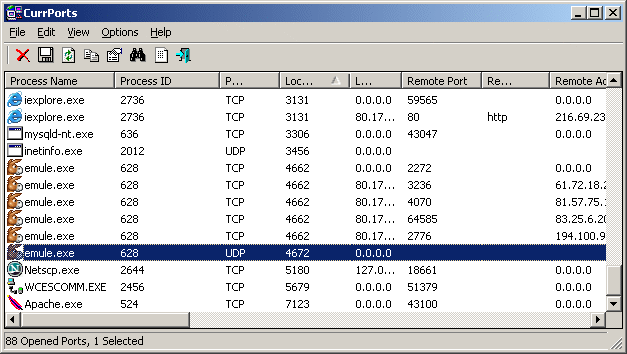
Monitoring Opened TCP/IP Network Ports/Connections


CurrPorts is network monitoring software that displays the list of all currently opened TCP/IP and UDP ports on your local computer. For each port in the list, information about the process that opened the port is also displayed, including the process name, full path of the process, version information of the process (product name, file description, and so on), the time that the process was created, and the user that created it. 
In addition, CurrPorts allows you to close unwanted TCP connections, kill the process that opened the ports, and save the TCP/UDP ports information to HTML file , XML file, or to tab-delimited text file. 
CurrPorts also automatically mark with pink color suspicious TCP/UDP ports owned by unidentified applications (Applications without version information and icons)

By TECHXPAN with No comments

Internet Download Manager

Internet Download Manager (IDM) is a tool to increase download speeds by up to 5 times, resume and schedule downloads. Comprehensive error recovery and resume capability will restart broken or interrupted downloads due to lost connections, network problems, computer shutdowns, or unexpected power outages. Simple graphic user interface makes IDM user friendly and easy to use.Internet Download Manager has a smart download logic accelerator that features intelligent dynamic file segmentation and safe multipart downloading technology to accelerate your downloads. Unlike other download managers and accelerators Internet Download Manager segments downloaded files dynamically during download process and reuses available connections without additional connect and login stages to achieve best acceleration performance.

Features:
  • All popular browsers and applications are supported!
  • Easy downloading with one click.
  • YouTube Grabber.
  • Automatic Antivirus Checking.
  • Drag and Drop.
For more features Read Here

By TECHXPAN with No comments

Guidelines for Safe Downloads


  • While downloading any file close all the applications that are running on your computer, let only one set-up file run at a time of downloading.
  • Close all the important applications in order to be safe if something goes wrong while downloading.
  • Set firewalls, set antivirus to actively scan all the files you download.
  • Scan all the files after you download whether from websites or links received from e-mails.
  • Always use updated antivirus, spam filter and spyware to help detect and remove virus, spyware from the application you want to download.
  • Never download any files like music, video, games and many more from untrusted sites and don’t go by the recommendations given by your friends or made by any random website's comments.
  • Check that the URLs are same and always download games, music or videos from the secure websites like which use HTTPS websites instead of HTTP. In the web address, it replaces “http” to https”. The https refers to the hypertext transfer protocol secure.
  • Download anything only from thrust worthy websites. Don’t click links to download anything you see on unauthorized sites.
  • If any dirty words appear  on the website just close the window no matter how important it is, because  spyware may be installed on your PC from such websites.
  • Check the size of the file before you download, sometimes it shows a very small size but after you click it increases the size of the file.
  • Never believe anything which says click on this link and  your computer settings will be changed and your PC can be turned into XBOX and can play unlimited games on your computer.
  • Don’t accept anything that offers you free download because that may contain malicious software.
  • Don’t click the link or file and let it start download automatically, download the file and save where you want save and then run on the application.
  • Set secure browser settings before you download anything.
  • Read carefully before you click on install or run application. That means read terms and conditions.
  • Don’t download anything until you know complete information of the website and know whether it is an original site of an original company.
  • Never download from the links that offer free antivirus or anti spyware software, always download from trusted sites, if you are not sure about the site you are downloading, enter the site into favourite search engine to see anyone posted or reported that it contains unwanted technologies.

By TECHXPAN with No comments

Guidelines for maintaining a good password

  • Use at least 8 characters or more to create a password. The more number of characters we use, the more secure is our password.
  • Use various combinations of characters while creating a password. For example, create a password consisting of a combination of lowercase, uppercase, numbers and special characters etc..
  • Avoid using the words from dictionary. They can be cracked easily.
  • Create a password such that it can be remembered. This avoids the need to write passwords somewhere, which is not advisable.
  • A password must be difficult to guess.
  • Change the password once in two weeks or when you suspect someone knows the password.
  • Do not use a password that was used earlier.
  • Be careful while entering a password when someone is sitting beside you.
  • Do not use the name of things located around you as passwords for your account.

By TECHXPAN with No comments

    • Popular
    • Categories
    • Archives