SLIDE-1-TITLE-HERE

Replace these every slider sentences with your featured post descriptions.Go to Blogger edit html and find these sentences.Now replace these with your own descriptions.This theme is Bloggerized by Lasantha - Premiumbloggertemplates.com[...]

SLIDE-2-TITLE-HERE

Replace these every slider sentences with your featured post descriptions.Go to Blogger edit html and find these sentences.Now replace these with your own descriptions.This theme is Bloggerized by Lasantha - Premiumbloggertemplates.com[...]

SLIDE-3-TITLE-HERE

Replace these every slider sentences with your featured post descriptions.Go to Blogger edit html and find these sentences.Now replace these with your own descriptions.This theme is Bloggerized by Lasantha - Premiumbloggertemplates.com[...]

If you are going [...]

SLIDE-4-TITLE-HERE

Replace these every slider sentences with your featured post descriptions.Go to Blogger edit html and find these sentences.Now replace these with your own descriptions.This theme is Bloggerized by Lasantha - Premiumbloggertemplates.com[...]

SLIDE-5-TITLE-HERE

Replace these every slider sentences with your featured post descriptions.Go to Blogger edit html and find these sentences.Now replace these with your own descriptions.This theme is Bloggerized by Lasantha - Premiumbloggertemplates.com[...]

Showing posts with label Security. Show all posts

Sunday, 27 November 2011

HijackThis

Trend Micro HijackThis is a free utility that generates an in depth report of registry and file settings from your computer. HijackThis makes no separation between safe and unsafe settings in its scan results giving you the ability to selectively remove items from your machine. In addition to this scan and remove capability HijackThis comes with several tools useful in manually removing malware from a computer.


HijackThis opens you a possibility to find and fix nasty entries on your computer easier.
Therefore it will scan special parts in the registry and on your harddisk and compare them with the default settings. If there is some abnormality detected on your computer HijackThis will save them into a logfile. In order to find out what entries are nasty and what are installed by the user, you need some background information.
A logfile is not so easy to analyze. Even for an advanced computer user. With the help of this automatic analyzer you are able to get some additional support. Just paste your complete logfile into the textbox in this page


Source

By TECHXPAN with No comments

Saturday, 26 November 2011

Useful Antivirus Programs

Antivirus is a program used to prevent, detect and remove virus and malwares etc from your system. Keep your computer safe by installing good antivirus.

These are some of the famous antivirus programs:

By TECHXPAN with No comments

Friday, 25 November 2011

Keep Your System Safe Using Malwarebytes


Malwarebytes is a powerful tool that helps to detect and removes all traces of malwares from your system.

Features:
Lightning fast scan speeds.
Full scans for all drives.
Priority database updates.
Ignore list for both scanner and protection module.
Extra utilities to help remove malware manually.


Download

By TECHXPAN with No comments

Thursday, 24 November 2011

Free VPN Services

ProXPN

What proXPN does...
  • upgrades your internet connection with VPN encryption
  • secures all types of connections from DSL and cable to 3G
  • gives you 100% private access to the internet
  • get an IP address in the USA, UK, or NL

By TECHXPAN with No comments

Wednesday, 23 November 2011

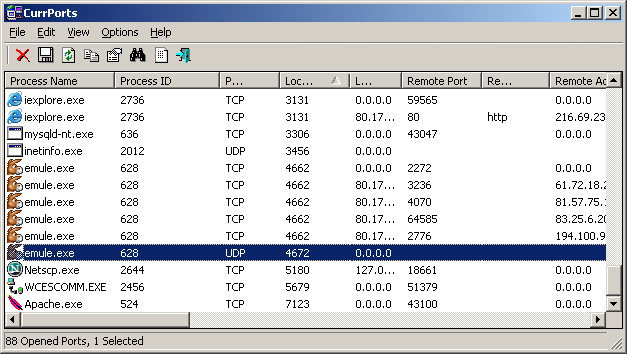
Monitoring Opened TCP/IP Network Ports/Connections


CurrPorts is network monitoring software that displays the list of all currently opened TCP/IP and UDP ports on your local computer. For each port in the list, information about the process that opened the port is also displayed, including the process name, full path of the process, version information of the process (product name, file description, and so on), the time that the process was created, and the user that created it. 
In addition, CurrPorts allows you to close unwanted TCP connections, kill the process that opened the ports, and save the TCP/UDP ports information to HTML file , XML file, or to tab-delimited text file. 
CurrPorts also automatically mark with pink color suspicious TCP/UDP ports owned by unidentified applications (Applications without version information and icons)

By TECHXPAN with No comments

Google Account - Getting started with 2-step verification


Why you should use 2-step verification

2-step verification adds an extra layer of security to your Google Account by requiring you to have access to your phone – as well as your username and password – when you sign in. In addition to your username and password, you'll enter a code that Google will send you via text or voice message upon signing in.

2-step verification drastically reduces the chances of having the personal information in your Google account stolen by someone else. Why? Because hackers would have to not only get your password and your username, they'd have to get a hold of your phone


By TECHXPAN with No comments

Secure Your PC


Operating System Security

Operating System is the important program that runs on the computer. It performs basic tasks like recognizing the input from the keyboard, controlling various files and directories in the hard disk and also various peripheral devices like printers, scanners etc...It will control the program in such a way that they do not interfere with one another.It is responsible for securing the system by not allowing the unauthorized users to access the system.

Need for securing the Operating System

The security of the operating system running on various PCs  plays an important role in the security of the network as a whole. Not updating one system in the network may affect the security of the other systems in the network. Today we have a highly sophisticated operating system with lots of features, but it may be vulnerable if they are not administered, configured and monitored properly. Sometimes updating the operating system with latest patches may lead to interoperability issues with other operating systems. Hence proper care should be taken while updating the operating system.

Guidelines for securing the Operating System

Whether you’re using your computer at home or travelling with your notebook PC, the following are basic guidelines for securing System.

Update OS

It is important to install latest patches that are available for operating system. You need to update them regularly to prevent malware coming into your computer.Enable automatic updates for your OS or you can also update manually going to website like microsoft  and check for your OS updates that are available .

Install an antivirus product and keep up to date

Viruses, worms and other malware are some of the most prolific problems on the internet today.But the same time, there are some good  antivirus applications that provide a great deal more protection than just searching for viruses. However, any antivirus product is only as good as you are about keeping it up-to-date and scanning your system regularly.

Enable Computer Firewall

Like antivirus products, Firewall products are designed to protect your system from Internet threats like hackers, viruses, and worms by filtering out any suspicious communications sent to your computer.

Use Strong Passwords 

Passwords control access to files, programs, computers, hard drives and networks. They also deny access to unauthorized users. Poorly chosen passwords make it easier to break into your computer systems and expose to malicious attacks. In general, set up passwords and keep them secret never share it with others.


Source: Infosecawareness

By TECHXPAN with No comments

Guidelines for Safe Downloads


  • While downloading any file close all the applications that are running on your computer, let only one set-up file run at a time of downloading.
  • Close all the important applications in order to be safe if something goes wrong while downloading.
  • Set firewalls, set antivirus to actively scan all the files you download.
  • Scan all the files after you download whether from websites or links received from e-mails.
  • Always use updated antivirus, spam filter and spyware to help detect and remove virus, spyware from the application you want to download.
  • Never download any files like music, video, games and many more from untrusted sites and don’t go by the recommendations given by your friends or made by any random website's comments.
  • Check that the URLs are same and always download games, music or videos from the secure websites like which use HTTPS websites instead of HTTP. In the web address, it replaces “http” to https”. The https refers to the hypertext transfer protocol secure.
  • Download anything only from thrust worthy websites. Don’t click links to download anything you see on unauthorized sites.
  • If any dirty words appear  on the website just close the window no matter how important it is, because  spyware may be installed on your PC from such websites.
  • Check the size of the file before you download, sometimes it shows a very small size but after you click it increases the size of the file.
  • Never believe anything which says click on this link and  your computer settings will be changed and your PC can be turned into XBOX and can play unlimited games on your computer.
  • Don’t accept anything that offers you free download because that may contain malicious software.
  • Don’t click the link or file and let it start download automatically, download the file and save where you want save and then run on the application.
  • Set secure browser settings before you download anything.
  • Read carefully before you click on install or run application. That means read terms and conditions.
  • Don’t download anything until you know complete information of the website and know whether it is an original site of an original company.
  • Never download from the links that offer free antivirus or anti spyware software, always download from trusted sites, if you are not sure about the site you are downloading, enter the site into favourite search engine to see anyone posted or reported that it contains unwanted technologies.

By TECHXPAN with No comments

Online Encryption & Decryption


Free Online Tools for Encrypting Text using 128-bit AES Encryption. Encrypt or decrypt text online with a password of your choice using this hand tool. This is service for securing your messages in an easy way. CRYPO system will encrypt your message using strong encryption algorithm, and it will be secure for sending. Web based online service for easy text and messages encryption and protection. CRYPO - Best encryption for network security.

Source: CRYPO

By TECHXPAN with No comments

How to decrypt GILA7>>HAZZ-15>>AER-256>>ATOM-128


Many  times i saw people asking 'How to decrypt GILA7>HAZZ-15>AER-256>ATOM-128' ?

The process is simple but a little tricky, up-loaders encrypt their plain text passwords so that only l33t people can access and use there stuff!. In order to decrypt a password or any plain text you need a decrypt-er (online or offline that's up to you)


Online Decrypter: CRYPO


This is a good site for encryption and decryption of passwords or any plain text. In order to understand how to decrypt you must first know how to encrypt plain text...

Let's take an example:
Suppose, i want to encrypt my password which is 'Password'

Step-1:
I will encrypt my password to ATOM-128 so that only those who knows how to decrypt ATOM-128 will get to know it:

Password >> encrypt to ATOM-128 Will Give Us this : gIhtnm0anxbC

Step-2:
Going a step further 
gIhtnm0anxbC >> encrypt to AER-256 Will Give Us this : 2215296.1169588016, 2341887.4432908865, -0.7052684144818926

Step-3:
Another step further 
2215296.1169588016, 2341887.4432908865, -0.7052684144818926 >> encrypt to HAZZ-15Will Give Us this :+KiYJgiLJZIY+gvLJgQI+4kojgj4jgiG+K+x+gQIJbIxJ4+b2gHI24vSjgj4jgiGngHMJdHS+KvIJ4kxJ4QY24ebJQ55

Step-4:
The final encryption level of this example
+KiYJgiLJZIY+gvLJgQI+4kojgj4jgiG+K+x+gQIJbIxJ4+b2gHI24vSjgj4jgiGngHMJdHS+KvIJ4kxJ4QY24ebJQ55 >> encrypt to GILA7 Will Give Us this :VelQ8zQLDzYV8NOwVr3rgJQLzzN4C+l6DI3UC+QLDzq40bl2Vr3f0zQR0u1VCSlRBI3=0g=e3OCUwrPeDI3QfrhL0JFVwJ1gVelr0zPeDx1VCKKwBMfOvNQfCgzG

This is about encryption, now you know how to encrypt 

The reverse of encryption is decryption ::: [we will take the same example again]

Step-1:
VelQ8zQLDzYV8NOwVr3rgJQLzzN4C+l6DI3UC+QLDzq40bl2Vr3f0zQR0u1VCSlRBI3=0g=e3OCUwrPeDI3QfrhL0JFVwJ1gVelr0zPeDx1VCKKwBMfOvNQfCgzG
>> decrypt to GILA7 Will Give Us this :+KiYJgiLJZIY+gvLJgQI+4kojgj4jgiG+K+x+gQIJbIxJ4+b2gHI24vSjgj4jgiGngHMJdHS+KvIJ4kxJ4QY24ebJQ55

Step-2:
+KiYJgiLJZIY+gvLJgQI+4kojgj4jgiG+K+x+gQIJbIxJ4+b2gHI24vSjgj4jgiGngHMJdHS+KvIJ4kxJ4QY24ebJQ55
>> decrypt to HAZZ-15 Will Give Us this : 2215296.1169588016, 2341887.4432908865, -0.7052684144818926

Step-3:
2215296.1169588016, 2341887.4432908865, -0.7052684144818926 >> decrypt to AER-256Will Give Us this : gIhtnm0anxbC

Step-4:
gIhtnm0anxbC >> decrypt to ATOM-128 Will Give Us this : Password

Hope this will help

By TECHXPAN with No comments

Guidelines for maintaining a good password

  • Use at least 8 characters or more to create a password. The more number of characters we use, the more secure is our password.
  • Use various combinations of characters while creating a password. For example, create a password consisting of a combination of lowercase, uppercase, numbers and special characters etc..
  • Avoid using the words from dictionary. They can be cracked easily.
  • Create a password such that it can be remembered. This avoids the need to write passwords somewhere, which is not advisable.
  • A password must be difficult to guess.
  • Change the password once in two weeks or when you suspect someone knows the password.
  • Do not use a password that was used earlier.
  • Be careful while entering a password when someone is sitting beside you.
  • Do not use the name of things located around you as passwords for your account.

By TECHXPAN with No comments

    • Popular
    • Categories
    • Archives